If you have spent any time in the world of technical Search Engine Optimization you have probably heard of Resource Hints. Resource Hints are snippets of code like dns-prefetch, preload and preconnect. The general wisdom has always been that adding Resource Hints to your site will make it faster and better for Google.
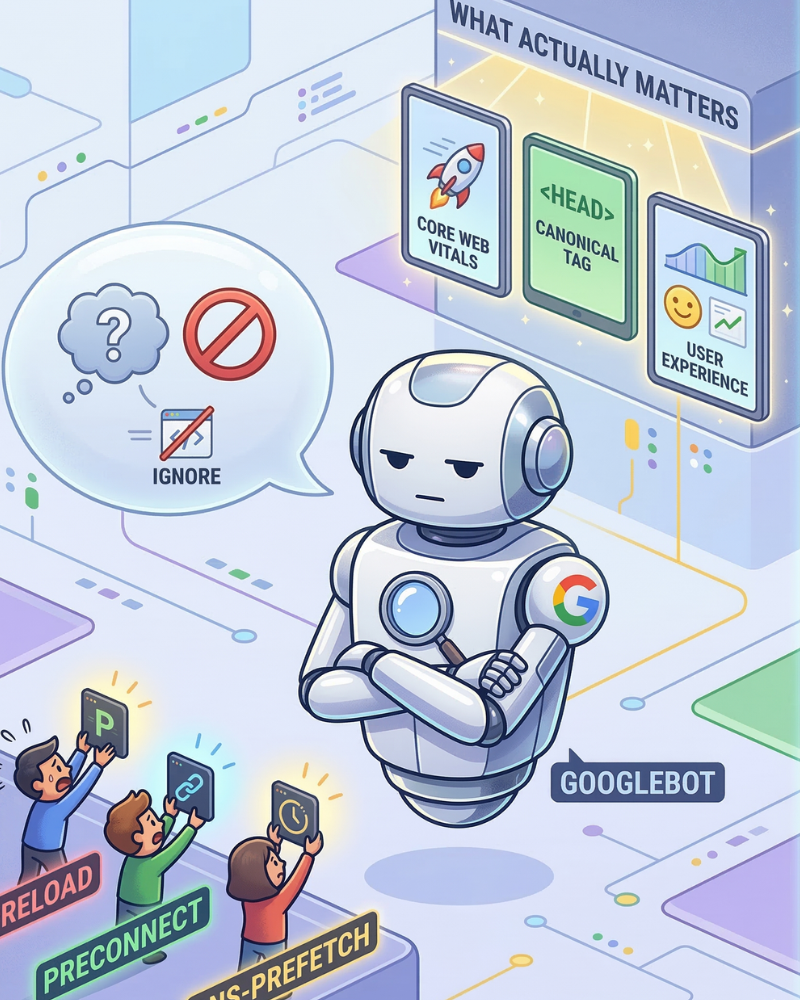
However in an episode of the Search Off the Record podcast Googles Gary Illyes and Martin Splitt said something that was a bit surprising. They explained that while Resource Hints are great for users, Googlebot, which is Googles web crawler completely ignores Resource Hints.
In this post we are going to break down why Google does not care about your Resource Hints, why your HTML does not need to be perfect to rank and the one technical mistake that could actually get your site kicked out of search results.
1. The Myth of the Resource Hint
First lets define what we are talking about. Resource Hints are instructions you give to a web browser, like Chrome or Safari to help it load a page faster.
DNS-Prefetch is like saying: “Hey browser we are going to need to talk to this website soon so look up its address now.”Preconnect is like saying: “Go and start opening a connection to that server so we are ready when the user clicks.”
Preload is like saying: “Download this image or font right now because we are going to need it in a second.”
To a human on a smartphone with a 4G connection Resource Hints are very helpful. They reduce the delay before a page starts working.
Why Googlebot Does Not Need Resource Hints
Gary Illyes explained that Googlebot does not operate like a person on a cell phone. Google crawls the web from inside its massive high-speed data centers.Googles Gary Illyes said that Resource Hints are very helpful if you have an internet connection but Google does not need them because it can talk very fast to all the servers.
In short: Google’s internet is so fast that it does not experience the delay that Resource Hints are designed to fix. Furthermore Google handles resources differently than a browser. A browser tries to load everything at once to show you a working page. Googlebot saves resources separately. Often processes them later. Because it is not trying to show you a working page in time, those hints to hurry up and load something are irrelevant to its workflow. Resource Hints are just not important for Googlebot.
2. Does Valid HTML Matter for Ranking?
For years people who check websites for search engines have been saying that “HTML Validation Errors” are a problem. You might get a report that says your website is “broken” because you forgot to close a div tag or used a tag in the way.Many website owners get worried thinking these mistakes will hurt their rankings.. Gary Illyes said that HTML validity does not affect rankings.
The “Binary” Problem Gary explained that validity is like a yes or no question. Your code is either completely valid or it is not. There is no in between.
If Google used validity to decide rankings a small mistake in the code could make a good article “invalid”. Google wants to find the information for the user, not the website with the perfect code.
Long as Google can understand what is on your page a few small coding mistakes will not stop you from being number one.
3. The “Head” vs. The “Body”: A Technical Trap While Google is not too worried about coding mistakes they are very strict about where you put your most important information. In HTML the head section is for information that people do not see, like your title tag and SEO instructions. The body is for the content that people actually see. Martin Splitt warned about a mistake: The Disappearing Head.
The Iframe Accident Sometimes a developer might put a piece of code like an iframe or a script in the place. At the top of the head section. When a browser or Google sees an iframe it thinks, “iframes belong in the body so the head must be over”. It then closes the head. Moves everything else into the body.If your important SEO tags, like your Canonical tag or your Hreflang tags get moved into the body because of this mistake Google will ignore them.
Why is Google so strict about this? Gary explained that if Google allowed these tags in the body it would be a security risk. If Google accepted a tag in the body a hacker could add a little bit of code to your comments or forum posts that tells Google “this page actually belongs to a different website”. This could take away your SEO value.To prevent this Google only trusts these directives if they are, in the true head of the document.
4. What Should You Focus On Instead? If resource hints don’t help Googlebot and HTML validation doesn’t help rankings what should a SEO professional focus on?
User Experience Still Wins
Just because Googlebot ignores preload hints doesn’t mean you should delete them. These hints make your website faster for people. When your website loads quickly people are more likely to stay on it and explore. Google uses Core Web Vitals, like speed and stability as a factor. These metrics are based on data from Chrome users. So if your resource hints make your site feel faster for humans your Core Web Vitals scores will improve. This will help your SEO.
The main thing is to focus on people, not the bot. Think about what makes your website great for users.
Use ETags for Better Crawling If you want to help Googlebot look into ETags. This tells Google that a page hasn’t changed since it was last visited. This saves Googlebot from re-downloading the page. This saves your server bandwidth. Keeps the crawler happy.
Double-Check Your Header Placement Run a “Live Test” in Google Search Console. Look at the “Rendered HTML.” If your Canonical tags or Robots tags are inside the <body> tag of the <head> you need to fix this right away.
5. Summary: Simple Rules for Modern SEO
Here are some rules for handling your sites code: Keep Using Resource Hints**: They don’t help Googlebot crawl better.. They make your site fast for humans. Google likes sites that people enjoy using. Don’t Worry About HTML Errors**: If a page looks good and works well Google will likely read it fine. Don’t lose sleep over a invalid” tags.Keep SEO Tags at the Top**: Keep Canonical, Hreflang and Noindex tags at the top of your code. Make sure no “body” elements are above them.
Use Semantic Markup**: Use <h1> for titles and <article> for posts. This is great for accessibility. It helps users with screen readers.. It’s not a secret sauce, for ranking higher.
Googles infrastructure is getting more powerful every day. Its becoming more human-like. The best strategy is to stop trying to trick the crawler. Instead focus on building a fast and organized website. Serve your audience well. If your users are happy Google usually is too.