
How to Turn Google’s Performance Max Into an E-commerce Growth EngineIn the world of shopping Google Ads is a very powerful tool for businesses.Recently Google introduced a type of campaign called Performance Max or PMax for short.It uses intelligence or AI to show ads across all Google platforms like Search, YouTube, Gmail and Maps from one campaign.
PMax is good at finding customers. It can feel like a mystery.
Many business owners feel like they are giving Google their credit card and hoping for the best.
One big problem is that Google’s AI spends all the money on selling products and new items or lesser-known products get no visibility.If you feel like you’re losing control over ad spending this guide is for you.We’re going to explain a way to manage Performance Max.We will use a framework to help you get control back and increase sales with Performance Max and Google Ads.This way you can make the most of your ad spend, with Performance Max.
The Problem with the Standard Setup
Most e-commerce stores set up their ads by what kind of thing they’re selling. For example they put all Shoes in one group and all Accessories in another group. This seems like an idea at first.. For a tool like PMax that uses artificial intelligence this way of doing things has some big problems.
The Star Monopoly: Google likes things that’re already popular. If one pair of sneakers is selling well Google will keep showing that ad to people. This might sound good. It means that your other Shoes, like the other 50 pairs might not get shown to customers.
The Newbie Struggle: New products do not have any sales history yet. Because PMax uses data to make decisions it often ignores products because it does not know if they will sell well or not.
The Zombie Effect: Some products are really good. People are just not clicking on them. These products become like Zombies. They just sit there in your ads. Never get any visitors even though they could be making you a lot of money.
To make things better we need to stop thinking about what kind of thing we’re selling and start thinking about how well our ads are doing. We need to think about the performance of our ads, like PMax and how we can make them work better for all of our products, including Shoes and Accessories.
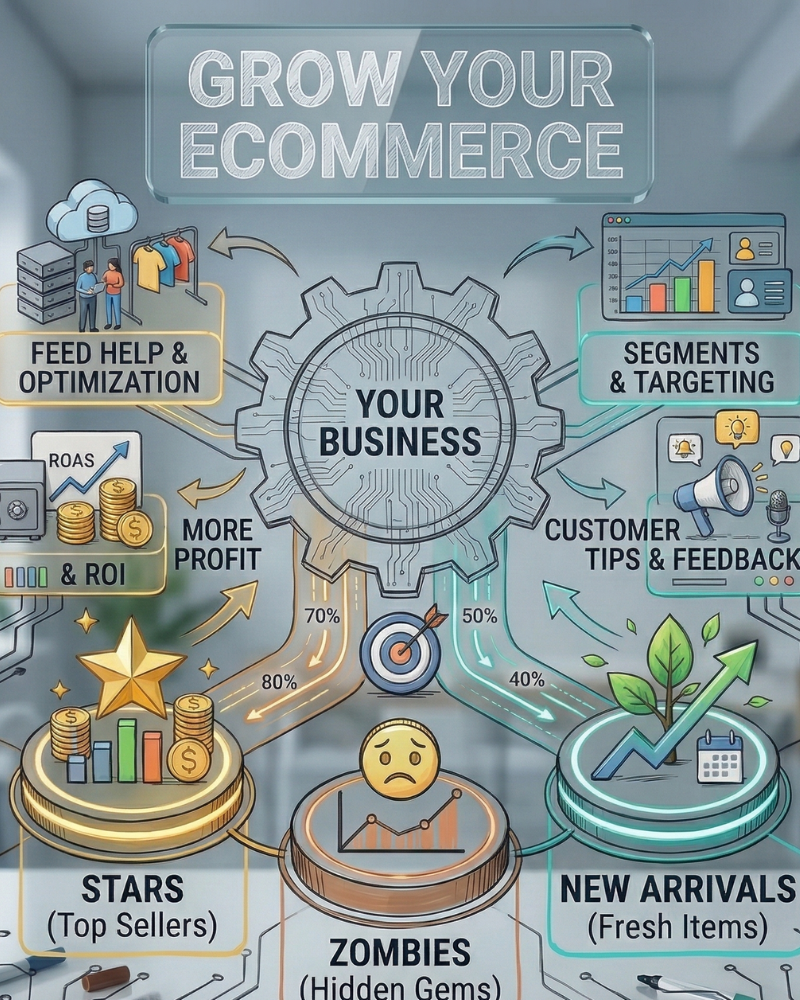
Step 1: Divide Your Products into Three Groups of grouping items by what they are group them by how well they sell. This creates a system where products move around based on how they’re doing right now.
Star Products
These are your sellers. They make a lot of money get lots of clicks and sell consistently.
Goal: Keep making profit from them.
Strategy: Tell Google to focus on selling these products in a way that makes profit. Set a target for how much money you want to make from ads compared to what you spend.
Zombie ProductsThese are products that nobody is paying attention to. They might be good. The computer algorithm doesn’t know that yet because they haven’t had enough chances to show what they can do.Goal: Get them noticed and see if they work.
Strategy: Set a target for how much money you want to make from ads or give them their own budget. The goal is to get information to see if they can become top sellers.
New Arrivals-These are products that just launched. They don’t have any history so they can’t compete with your sellers.Goal: Get people to know about them and gather information.
Strategy: Put them in their campaign. Use a rule, like “any product added in the 30 days” so they have a fair chance to get noticed.
Step 2: Define Your Rules
To make this work you have to figure out what makes a product a Star or a Zombie. Every business is unique but here is a simple way to start:
Stars: These are products with a return on ad spend that’s more than three times the cost and they have been clicked more than 20 times in the last two weeks.
Zombies: These are products that have been clicked than 10 times in the last two weeks.
New Arrivals: These are products that you have added to your store in the 30 days.
When you set these rules for your Stars and your Zombies you do not have to guess what to do with your marketing, for your Stars and your Zombies.
Step 3: Use a Shorter Analysis WindowMost marketers look at the 30 days of data from their online stores.. In the world of online shopping 30 days is really long. Things change fast like the seasons and other companies lower their prices.
Try looking at the 14 days instead. This way you can make changes faster. If a product is not doing well you can move it to a group before you spend too much money on it. If a new product is selling well you can give it a special status right away.
Step 4: Automate the Movement-This is what makes it all work. If you have a lot of products like 1,000 you cannot move them around every day by yourself. That is where tools like Channable come in. You can set up rules that do the work for you. For example:
IF products return on ad spend is too low like below 2.0 THEN move it to the Zombie campaign.
IF a Zombie product makes a sale THEN move it to the Stars campaign.
IF a product is old than 30 days THEN remove it from the New Arrivals group.
This makes your online ads work better by themselves. Your money will go where it is needed most without you having to do anything.
Step 5: Think Beyond Google
The idea of Stars and Zombies and New Arrivals should not be limited to Google. You can use this idea for other things like,Meta which includes Facebook and Instagram: use your Stars to make your Advantage plus shopping campaigns better.
TikTok is a place to use New Arrivals because it is where younger people go to see what is new and trendy.
You can also use Email Marketing to send emails to your best customers that feature your Stars.
When you have all your performance data in one place, for all the channels you use your whole marketing plan will work better. This will happen because you will have all the information you need for your Stars and your marketing strategy will be more efficient.
Does This Really Work?
Lets look at an example.
La Maison Simons, a fashion retailer had some problems. A few selling items were using up most of their budget. Meanwhile new products were being ignored.
They tried a way of looking at their product performance. The results were huge:Their Return, on Ad Spend (ROAS) almost doubled in three years.The average amount customers spent per order (AOV) went up by 14 percent.Products that were not selling before became some of their best sellers.The point is simple: When you give every product a chance, based on data you find sales opportunities you did not know existed. La Maison Simons used this method. It worked for them. They sold more of their products
